
Screenshots
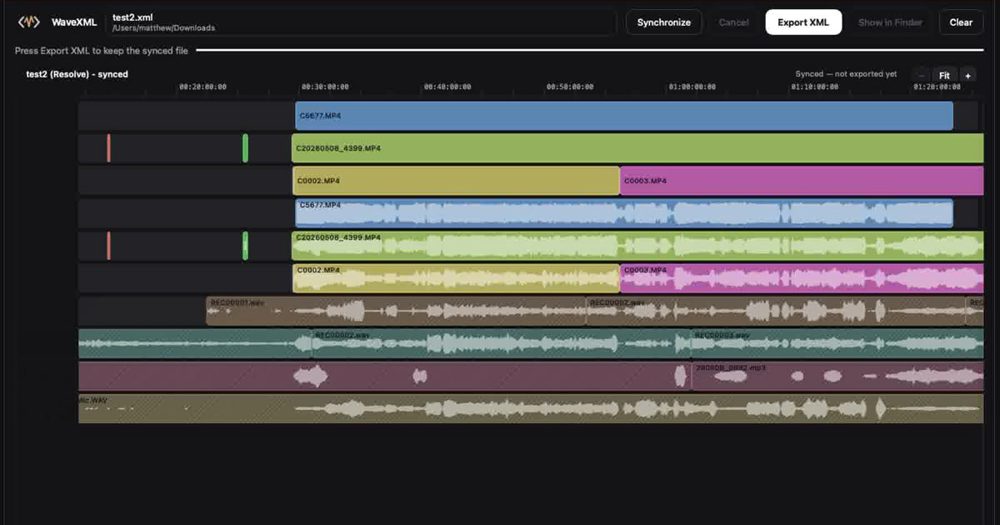
About
WaveXML auto-syncs Zoom / Sound Devices dual-system audio to camera footage via an XML round-trip for DaVinci Resolve, Adobe Premiere Pro, and Final Cut Pro. It is built for editors who record sound separately from picture and want their clips lined up without hand-matching waveforms or slates.
How it works: export your timeline from your editor as FCP7 XML or FCPXML and drop it into WaveXML. Press Synchronize. WaveXML matches each camera clip to the separately recorded production audio, then writes a new XML. Import that XML back into DaVinci Resolve, Premiere Pro, or Final Cut Pro and keep cutting with picture and sound already in sync.
Who it is for: wedding and event shooters running multi-cam setups, interview and documentary crews using boom and lav recorders, and anyone who relied on PluralEyes-style timeline sync and wants a simple replacement that fits into an existing editing workflow.
Why editors like it: processing happens locally on your own computer. There is no plugin to install inside your editor and nothing is uploaded to a server, so your footage stays on your machine.
Availability: WaveXML is a free Mac and Windows beta. It runs on macOS (Apple Silicon and Intel) and Windows 64-bit. The beta is the full app, with no clip limits and no feature limits. Register on the website to receive the installers.
Maker tools
Prepare the page, the images and the launch around a product like this one.
Ranked with other live products in this category: Best productivity tools for indie makers
See where this pricing label ranks: Best free tools for indie makers
Learn from other listings: product description examples, product tagline examples
Pricing


Free beta. Full app, no clip or feature limits.
Platforms


- macOS
- Windows
No ratings yet

 Idea

 Execution

 Design

 Value
Comments (0)
Sign in to leave a comment.
No comments yet. Be the first to share your thoughts!