How often should a small SaaS test restoring its backups?

Most small teams can tell you where their backups go. Far fewer can tell you the last time anyone loaded one into a fresh database and logged in. Those are different facts, and only the second one matters on the day something is deleted.
This article is about the gap between a backup that exists and a backup that restores. It uses the public postmortem from the 2017 GitLab.com database outage, the PostgreSQL documentation on dumps and backup verification, the Backblaze drive failure reports for 2019 to 2025 and the 3-2-1 rule, then turns them into a restore routine small enough for one person to run. The numbers describe other people's systems. They do not predict yours, and where a suggestion is our own, it says so.
A backup is a promise about a restore
A green check on a backup job tells you only what the job was built to check, and that depends on how it was written. In many setups it means a program ran and returned success. By itself that does not show that the file has content, that the content is current, that your database version can read it, that the credentials to decrypt it still exist or that the restore finishes before your customers give up.
Think of the promise in two numbers. How much recent data can you afford to lose, and how long can the product stay down? Engineers call these the recovery point and the recovery time. You do not need the jargon, but you do need your own answers, because a restore test is how you find out what the real numbers are rather than the ones you hoped for.
What the GitLab outage shows
On 31 January 2017 an engineer at GitLab, while trying to repair database replication, removed the data directory on the wrong server. By GitLab's own account in its public postmortem, around 300 GB of data was gone from the primary before the command was stopped. The team went looking for backups.
The postmortem lists what they found, and it reads like a checklist of how backups quietly fail:
- The scheduled dump had never produced files. The job used pg_dump version 9.2 against a database running PostgreSQL 9.6. The mismatch made the tool exit with an error, so the S3 bucket where dumps should have been was empty.
- The error went unseen. Failure notifications were sent by email, but GitLab says the receiving mail servers rejected the messages because the emails failed the servers' DMARC checks. Nobody saw the alarm because the alarm itself was broken.
- Disk snapshots were not enabled for the database servers. Snapshots existed for other machines, and the team had assumed the other backups covered the database.
- Replication was not a backup. The standby was meant for failover. Once it had been wiped as part of the repair attempt, there was nothing to fail over to.
- The best usable copy was a staging database, loaded from a snapshot taken about six hours earlier. GitLab says two snapshots were available, one almost 24 hours old and one made by an engineer roughly six hours before the outage, and it chose the newer one to limit data loss. The staging disks were slow network disks throttled to roughly 60 Mbps. GitLab says copying the data from staging to production took around 18 hours, and that it restored the database without webhooks at 17:00 UTC on 1 February, with the overall recovery taking over 18 hours.
GitLab says the lost database changes began at 17:20 UTC on 31 January. The postmortem gives the end of that window two ways: the introduction says 00:00 UTC, and its detailed data loss section says 23:30 UTC. Its estimates are roughly 5,000 projects, 5,000 comments and 700 new user accounts in the introduction, and at least 5,000 projects, 5,000 comments and roughly 700 users in the detailed section. Git repositories and wikis were stored separately and were not part of that loss. The company also said, plainly, that losing production data is unacceptable.
None of this required exotic technology. The postmortem does not say whether a restore from the dump was ever tried, but a restore test that ran the real procedure could have exposed the empty bucket, a test of the alert path could have exposed the rejected email, and a timed drill would have shown what a recovery from staging cost.
Do drives fail often enough to worry about
The GitLab incident was a human error. The other classic cause is hardware. Backblaze has published drive failure data for over a decade, covering the drives in its own data centers. The chart shows the annual failure rate it reported for the drives qualifying in each annual report from 2019 to 2025.
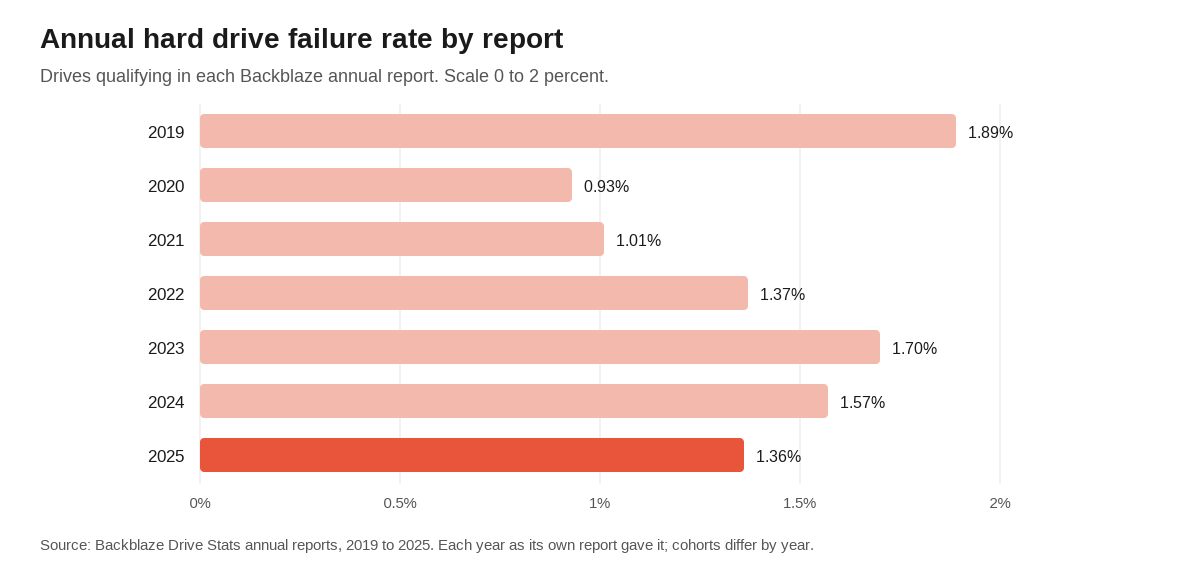
In every report the figure sat between about 0.9 and 1.9 percent. The 2025 report, published on 12 February 2026, gives 1.36 percent for the year and a lifetime figure of 1.30 percent. Each annual figure covers the drive models that qualified for that report, not literally every drive, and the eligibility rules differ from year to year. The 2025 report also quotes 2024 as 1.55 percent, while the 2024 report gave 1.57 percent; the likely reason is a different set of qualifying drives, but the reports do not say so, and the chart uses each year's own report. Treat these numbers as the range for a large, professionally monitored fleet, not as a promise for the disks under your desk or the volumes behind your hosting plan.
A hypothetical calculation shows the scale. It is editorial arithmetic, not a Backblaze claim, and a fleet failure rate is an annualized aggregate, not the probability for any one drive in your server. Suppose each drive had a 1.36 percent chance of failing in a year and drives failed independently. Then the chance that at least one of 2 drives fails would be about 2.7 percent, of 4 drives about 5.3 percent and of 8 drives about 10.4 percent. Independence is generous, because drives bought together and used together often age together. The point is not the exact figure. It is that the chance rises as you add drives, and that replacing a failed disk is only painless if the data on it exists somewhere else.
Most small products run on a managed database or a cloud volume, where the provider handles drive failures. That removes one risk and leaves the others: a bad migration, a deleted table, a leaked credential that wipes data, a vendor account lock, a bug in your own retention job. These happen to the data, not the hardware, so replacing a disk does not help. An independent snapshot taken before the event can help, if it is still retained and you can still reach it. A snapshot may be kept in the same account or behind the same credentials as production, in which case the same mistake or the same stolen key can delete it too. Whether your snapshots survive that kind of event is something to test, not assume.
What a restore test catches
A test restore finds three different kinds of problem, and it helps to look for each on purpose.
The backup is missing or empty. This is the GitLab bucket. Check that the newest file exists, that its age is within your schedule and that its size is close to the previous one. A sudden drop in size is a warning, not proof that a job failed, because legitimate deletions or a change in compression can cause it. Treat it as a reason to investigate before the next backup overwrites the evidence.
The backup cannot be loaded. The PostgreSQL documentation is direct about this. It says the output of pg_dump can be expected to load into servers newer than the tool's own version, and that it is not guaranteed to load into a server of an older major version. Cross version moves can also need extra options. Version drift is easy to introduce, because the database upgrades on one date and the backup container is rebuilt on another. For physical backups taken with pg_basebackup, the same documentation describes a tool called pg_verifybackup that checks a backup against its manifest, and then adds that its checks cannot include everything a running server will do, so you should still perform test restores and confirm the databases work and contain the correct data.
The restore works but is too slow or too old. This is the 18 hours. It only shows up when someone times the procedure on realistic data. A restore that takes ten minutes on a 200 MB test database is not evidence about the 80 GB database you will have in a year.
There is a fourth thing worth noticing. Point in time recovery, as the PostgreSQL documentation describes it, lets you restore to a chosen point within the range covered by your base backup and the continuous sequence of archived log files that follows it. If part of that chain is missing, the range is shorter than you think, and you may only find out by trying a recovery. Managed services such as Amazon RDS offer a similar feature within a retention period you configure. That period limits what automated recovery can reach. A manual snapshot you chose to keep, or an independent backup, may still exist after the window closes, which is one more reason to know exactly what you retain and for how long.
How often to test
No source gives a universal interval, so this is our own suggestion, based on how fast each kind of problem appears and how cheap each check is.
- Every day, automatically. Check that today's backup exists, is newer than your schedule allows and is not suspiciously smaller than yesterday's. Alert on failure, and make sure the alert reaches a person by a path you have tested.
- Every month, by hand or by script. Restore the latest backup into a scratch database on a separate instance, never over production. Run a short list of checks, described below. Record the time it took.
- Every quarter, as a drill. Pretend production is gone. Follow the written runbook from nothing, with a person who did not write it if you have one. Time the whole thing, from the decision to restore until a user can log in.
- After any change that touches the data path. A major database upgrade, a new hosting plan, a changed encryption key, a new backup tool or a move between regions all warrant an extra restore test the same week.
For a solo founder this is perhaps an hour a month once the script exists, and a half day each quarter. It is a small price compared with discovering the problem in the middle of an outage.
What to check after a restore
A restore that starts the database is not a pass. Keep a short list and run it every time:
- The row counts of three or four important tables are close to production, allowing for the age of the backup.
- The newest record's timestamp matches the age of the backup you expected.
- A few records you can recognize, such as your own test account, load correctly.
- The application boots against the restored database and a login works.
- Large objects that live outside the database, such as uploads, are present where the database points to them.
- The elapsed time is written down.
Be careful that a restored copy cannot do harm. GitLab's own recovery notes describe removing webhooks from the staging copy so that restored data would not trigger outside calls by accident. Your version is the same idea: turn off outbound email, payment webhooks and scheduled jobs in the scratch environment, or point them at a sink, so a test does not send a thousand real customers a password reset.
Where the copies should live
The common rule of thumb for how many copies to keep is the 3-2-1 rule. Backblaze describes it as three copies of your data, on two different media, with one copy off site. For a small product that could mean the live database on your host's disk, a backup on a different kind of storage such as an object storage bucket, and a third copy off site with another provider. Three cloud copies in separate regions are a useful resilience step, but they do not by themselves satisfy the two different media part of the rule.
Two practical notes follow from the incidents above. First, a copy that shares credentials with production is not independent. If one stolen key can delete both, it is closer to one copy than two. Second, a replica is not a backup. It can carry a mistake along with everything else, including a deleted table, depending on timing and replay configuration. Some setups delay replay on purpose, which helps, but that is a deliberate backup design and not what a plain replica gives you.
Write down the runbook while you are calm
The cheapest improvement is a single page that says where backups are, how to get them, which command restores them, who holds the keys and what to check afterward. The GitLab postmortem notes that restoring replication required manual work that was neither automated nor well documented, and that is the situation a runbook exists to prevent. Write it after a successful drill, with the real commands and the real durations, and fix it every time a drill finds something wrong.
Treat the results of each test as data. A tiny log with the date, the backup used, its age, the restore time, the checks that passed and anything that surprised you is enough. After three months you will know your real recovery time, and that number is worth more than any promise on a hosting page.
A starting plan
If you have not restored a backup this quarter, do these in order:
- Find the newest backup and confirm it exists and is plausible in size.
- Restore it into a scratch database on a different machine.
- Run the six checks above and time the whole thing.
- Add a daily freshness check that alerts you, then break it on purpose to see whether the alert arrives.
- Put the steps in a one page runbook and schedule the next test.
When your product is stable enough to be found, it is also a good moment to get it in front of people. If you want one more place where makers and early customers can discover it, you can submit it to RadarMakers for free. Our launch checklist covers the other tasks around a release, and the best developer tools page ranks developer tools that other makers have shared.
Sources
The sources were checked on 16 November 2026. The GitLab facts come from its own published postmortem, not from an independent audit. The Backblaze figures describe the qualifying drives in its data center fleet, and each year is shown as its own report gave it, including the different 2024 value quoted later. The failure arithmetic and the test schedule are editorial suggestions, not results from any source. The PostgreSQL documentation was read in the current version, so details can differ for older releases.
- GitLab, Postmortem of database outage of January 31, 10 February 2017, what failed in each backup path, the 18 hour restore and the data lost.
- Backblaze, Hard Drive Stats for 2019, for 2020, for 2021, for 2022, for 2023, for 2024 and for 2025, published 12 February 2026, annual failure rates for the drives that qualified for each report.
- Backblaze, The 3-2-1 backup strategy, the definition of the rule.
- PostgreSQL Global Development Group, pg_dump, version compatibility of dumps.
- PostgreSQL Global Development Group, pg_verifybackup, what backup verification covers and does not cover.
- PostgreSQL Global Development Group, Continuous archiving and point in time recovery, the need for a continuous archive.
- Amazon Web Services, Working with backups in Amazon RDS, automated backups and the retention period.
0 replies
Sign in to join the discussion
Log in