Should a small SaaS offer two factor authentication at launch?
A customer asks whether your product supports two factor authentication. Perhaps it is a line in a buyer's security questionnaire, or a user concerned about a breach. For a solo founder, the decision includes implementation, recovery and support. Those are planning questions, not evidence that the feature must take a particular number of days to build.
The useful way to decide is to look at what a second step actually stops, what it costs you to run, and what the standards bodies say a sensible design looks like. This article uses a Google study from 2019, a Microsoft study from 2023, NIST's current authentication guidelines and the OWASP cheat sheet on multifactor authentication, then turns them into a plan small enough for one person to ship.
What a second step is supposed to stop
OWASP identifies weak, reused or stolen passwords as a common route to account compromise. A password can come from another breach or a fake login page. An attacker may be able to sign in without exploiting the application's code.
A second factor adds a different kind of proof, such as possession of an authenticator alongside a password. Two steps are not automatically two factors: a password followed by a PIN still asks for two things the person knows. Separate factors can reduce reliance on the password, but phishing and recovery weaknesses can still defeat some combinations.
Two kinds of attacker matter, and the evidence treats them differently:
- Automated attackers. Bots try leaked or guessed passwords against many sites at once.
- Targeted attackers. A person or a small group goes after a specific account, often with a convincing phishing page.
A control that is excellent against the first group can be only decent against the second. Keep that split in mind when you read the numbers below.
What Google measured
On 17 May 2019, Google's security blog published results from research on account hijacking. The chart below concerns device based challenges issued after suspicious sign ins. These were Google's automatic protections, not simply a trial of requiring enrolled two factor authentication at every login. The post reports what each challenge blocked during the investigation period, split by attack type.
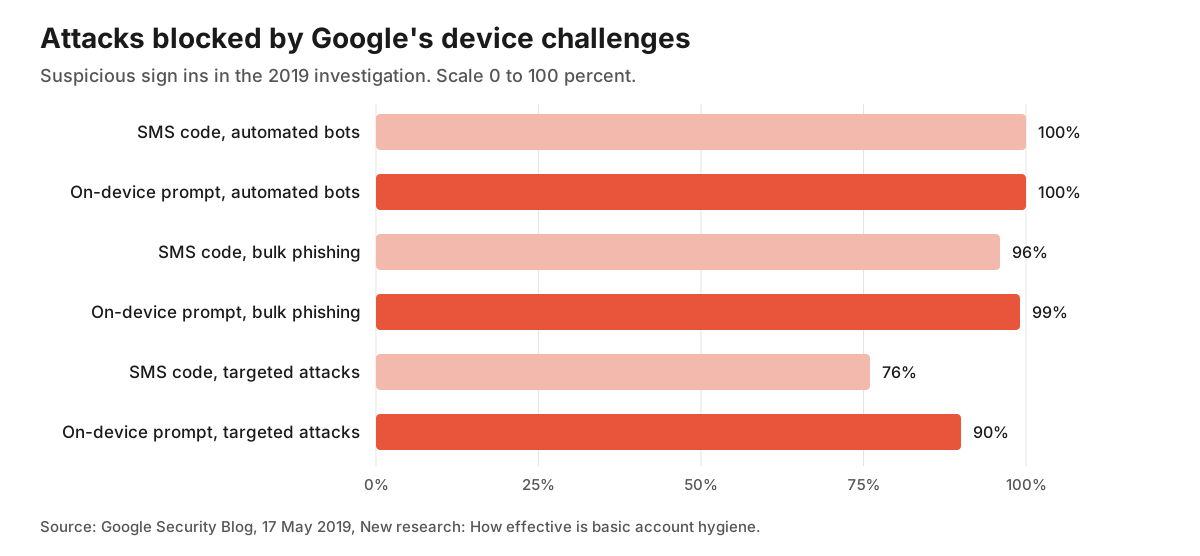
The post says an SMS code sent to a recovery phone number helped block 100 percent of automated bots, 96 percent of bulk phishing attacks and 76 percent of targeted attacks. On-device prompts, which Google describes as a more secure replacement for SMS, helped prevent 100 percent of automated bots, 99 percent of bulk phishing attacks and 90 percent of targeted attacks.
Both methods blocked a high share of the automated and bulk phishing attacks in this Google investigation. Against targeted attacks the reported SMS result was 76 percent and the prompt result was 90 percent. The post separately reports that zero users who exclusively used security keys fell victim to targeted phishing during the investigation. That observation is not a guarantee that every future attack will fail.
Be careful about what this does not show. The numbers come from Google accounts, not from your product. The post describes Google's own protections and is more than seven years old. It illustrates differences within that investigation, not a universal ranking or a forecast for your login page.
What Microsoft measured
In May 2023, six Microsoft authors posted a preprint on arXiv titled How effective is multifactor authentication at deterring cyberattacks. It covers accounts on Microsoft's identity platform between 22 April and 22 September 2022. The paper reports an estimated compromise rate of 0.0079 percent for accounts with multifactor authentication and 1.0071 percent for accounts without it, which it summarises as a 99.22 percent reduction in risk.
The authors separately examined 128,000 accounts with leaked passwords. Within that sample, they identified 7,861 accounts with multifactor authentication and confirmed attempts to use the passwords. Section 5 reports that MFA prevented 98.6 percent of attacks on those accounts. Table 2 reports failure rates by method in this attacked MFA group.
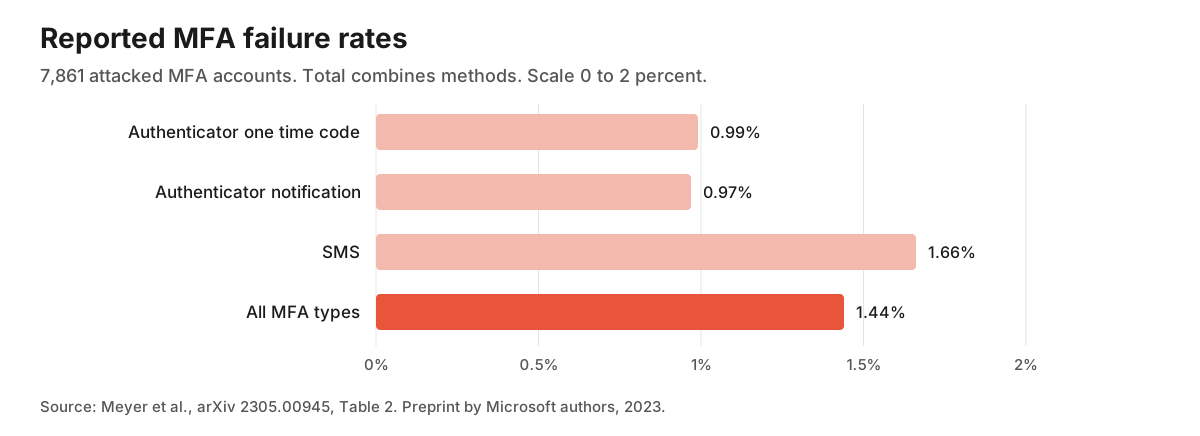
The total combines the methods; it is not a fourth independent method or a simple average to add to the other bars. The authors describe SMS as 40.8 percent less effective than Microsoft Authenticator. That is their reported comparison, not a 40.8 percentage point difference between these failure rates. Their abstract concludes that dedicated apps outperform SMS while both improve protection compared with no MFA.
Read this as an arXiv preprint, not evidence of journal peer review. Its benchmark uses accounts reviewed for suspicious activity, and its method combines manual review with sampling to estimate population compromise rates. The authors explain that reported compromises alone would undercount incidents. They also say Google's attacked account figures are not directly comparable with their population estimates. Neither study establishes the effect on your product or isolates a universal causal benefit for every deployment. Keep the population estimates and the leaked password subgroup separate.
What the standards say
Standards will not tell you whether a solo product needs this, but they do tell you what a defensible design looks like.
NIST's SP 800-63B-4 is a final July 2025 publication that supersedes SP 800-63B. It addresses authentication for government systems; it does not assign every commercial SaaS the same assurance level. At AAL2, two distinct factors and an offered phishing resistant option are required. TOTP alone is not the whole AAL2 requirement. Hand entered codes cannot provide phishing resistance because they can be relayed to another session; WebAuthn can bind authentication to the verifier's name.
NIST restricts SMS and voice authentication through the public telephone network. Conforming implementations must offer an unrestricted alternative and assess the risks; the guidance also recommends considering SIM changes and number porting. These requirements are a design reference, not a claim that following this article certifies your service.
The OWASP cheat sheet on multifactor authentication is more practical. It says the most important place to require it is at login, and lists actions where it may also be appropriate: changing a password, changing the email address on the account, disabling multifactor authentication and elevating a session to an administrative one. Its short recommendations are to require some form of multifactor authentication for all users and to require it for administrative or other high privilege users. It also says that any form is better than none, and that two instances of the same factor, such as a password and a PIN, do not count.
Which methods to offer first
These are implementation choices, not a ranking established for every small product. Check what your existing authentication provider supports before building a new credential system.
Authenticator app codes. RFC 6238, published in May 2011, extends the counter based HOTP method in RFC 4226 and recommends a default time step of 30 seconds. For network delay it recommends allowing at most one time step; clock drift is a separate consideration. The verifier must not accept a successfully used code again. Microsoft's Table 2 reports a 0.99 percent failure rate for app codes in its attacked MFA group, against 1.66 percent for SMS.
Passkeys or security keys through WebAuthn. Of these three choices, properly implemented WebAuthn offers phishing resistance. To use a passkey as MFA, OWASP says to require local user verification and validate the returned verification flag on the server. A touch proving presence alone is not a second factor. A security key can instead be paired with a password. Prefer an established supported implementation when available, and test enrollment and recovery across the devices you support. Do not postpone every phishing resistant option while claiming AAL2 conformity.
SMS, only with an explicit risk decision. NIST restricts it, and both studies report lower protection than their compared app methods. Consider interception, SIM swaps, delivery failures and message costs before offering it. If accepted, provide an alternative that does not rely on the telephone network and limit sends per account. A weaker fallback can become the route an attacker chooses, so adding SMS is not automatically a harmless convenience.
Email codes are not on this authentication list. NIST prohibits email for out of band authentication, but separately permits issued recovery codes sent to a recovery email address under its recovery rules. Do not turn that recovery permission into a claim that email is a conforming second factor, or that one email link can safely disable MFA.
The part that creates support tickets
The hard part of this feature is not generating the code. It is what happens when someone loses the phone.
OWASP names the causes of lock out directly, such as wiping or losing a phone without backing up the codes. It says there is no single best answer for recovery and lists several: single use recovery codes given to the user when they enrol, a one use code sent by post, a support contact with a rigorous identity check, or another trusted user vouching for them. It also says the recovery path must not give an attacker a way to bypass the second step. An easy "email me a link to turn it off" flow quietly cancels everything you just built.
NIST requires saved recovery codes to contain at least 64 bits from an approved random generator, be stored hashed, and be invalidated and replaced after use. Recovery must trigger a notification. At AAL2, one saved code alone is insufficient: a permitted route combines it with a bound single factor authenticator, such as the password. Other routes use recovery codes from two different methods, or repeat identity proofing where applicable.
The following implementation checklist is an editorial starting point. The example count of ten codes is a product choice, not a NIST requirement:
- Show ten single use recovery codes once, at enrolment, and ask the user to store them.
- Store only hashes of those codes, the same way you store passwords.
- Require fresh authentication with an existing factor before changing or removing one. If it is lost, use the documented recovery process rather than trusting only the active session or one email link.
- Email the user whenever a factor is added, removed or used for recovery.
- Rate limit code attempts per account. OWASP says to apply strict attempt limits and suggests considering longer codes where usability allows.
- Decide in advance what support does when someone has neither the phone nor the codes. If the answer is nothing, say so on the enrolment screen.
Keep recovery codes distinct from the shared secret that generates TOTP values. The server needs access to that secret to verify codes, so hashing it like a password will not work. RFC 6238 recommends secure key storage, encryption and restricted access. Do not log either the seed or live codes. Write the recovery process before enrollment opens, then test loss of a device as well as a successful login.
Push prompts have their own trap
If you use push approvals, plan for fatigue attacks. OWASP describes repeated approval requests intended to make a user accept one. It recommends number matching, caps on prompts and monitoring unusual bursts. TOTP does not use an unsolicited approval prompt, but its codes can still be captured and relayed by phishing. Number matching is also not equivalent to WebAuthn's phishing resistance.
Who should get it, and when to wait
Not every product needs this on day one. A rough way to decide, which is our own editorial suggestion and not a rule from any source:
- Build it now if the product holds other people's money, personal data, or customer data from their own users, or if you sell to teams and a buyer has already asked.
- Build it soon if accounts can publish things in public, send email, or connect to other services on the user's behalf. A hijacked account does damage beyond your own database.
- Wait, but write down the plan if the product is a free utility with no saved data, and a stolen account would cost the owner very little.
If you defer general customer enrollment, still protect administrative access and write down the remaining risk. NIST requires checking newly established passwords against a blocklist of commonly used, expected or compromised values, as well as limiting failed attempts. Those controls complement MFA rather than replace it. Notifications about unfamiliar sign ins are another product choice; do not promise that a notification prevents a takeover.
Require MFA for administrative accounts from the start, and decide requirements for other sensitive roles and actions from the risk. OWASP recommends requiring MFA for all users. For a lower risk customer flow, a phased optional rollout is an editorial tradeoff, not its recommendation or a route to claiming AAL2 for password only sessions. Have recovery ready before either rollout. Record the decisions and tested failure paths in your launch checklist.
What to tell a buyer who asks
When a customer asks about this in a questionnaire, give a short, verifiable answer. Say which methods you support, whether they are required or optional, what recovery permits, and what is missing. Do not claim compliance with a standard merely because you implemented one of its features. Separate a released capability from a roadmap item. For example, password login with attempt limits today and an authenticator option planned later are two different statements. A clear description lets the buyer assess its own requirements without relying on an implied guarantee.
Finishing a feature like this is also a good moment to tell people the product exists. If you want one more place where makers and early customers can find it, you can submit it to RadarMakers for free.
Sources
The sources were checked again on 15 November 2026. The Google figures come from the blog post, not an independent reanalysis of its underlying papers. Microsoft's Table 2 was checked in both the version 1 HTML and PDF. The bars reproduce reported failure rates, with the overlapping total labeled separately. The implementation and rollout suggestions are editorial choices, not measured effects. The NIST discussion uses its final publication, including AAL2, telephone network restrictions, phishing resistance and account recovery requirements.
- Google Security Blog, New research: How effective is basic account hygiene at preventing hijacking, 17 May 2019, share of attacks blocked by SMS codes and on-device prompts, security key result.
- Meyer et al., How effective is multifactor authentication at deterring cyberattacks?, arXiv preprint submitted 1 May 2023, compromise rates, leaked credential results, Table 2 and stated caveats. Checked in the HTML version and version 1 PDF.
- NIST, SP 800-63B-4, Digital Identity Guidelines: Authentication and Authenticator Management, sections 2.2, 3.1.3, 3.2.5, 3.2.9 and 4.2. Final publication record, July 2025.
- OWASP, Multifactor Authentication Cheat Sheet, where to require it, recovery guidance, attempt limits, fatigue attacks.
- IETF, RFC 6238, TOTP: Time-Based One-Time Password Algorithm, May 2011, default 30 second time step and delay window guidance.
0 replies
Sign in to join the discussion
Log in