How long should the demo video on a product page be?

A founder adds a demo video to the product page and then has to decide how long it should be. Two minutes feels thorough. Thirty seconds feels like a teaser. Neither feeling is evidence. The better question is what job the video does for a visitor who has not decided yet, and how much of it that visitor will actually watch.
Public data cannot tell you how your own visitors behave. It can show how long videos on ordinary web pages run, how much of a short video people watch on average, and which video attributes a crawl records. This article uses two public sources, the HTTP Archive Web Almanac and Wistia's published video data, and turns them into a plan for one short demo video that you can test.
What the data can and cannot say
The Web Almanac is a yearly report built from the HTTP Archive crawl. Its 2024 edition, published on 29 December 2024, draws on the June 2024 crawl and covers 16,935,953 websites, of which 16,130,357 were crawled as mobile sites. In the Media chapter it reports that 6.7 percent of mobile pages include at least one video element, and 7.7 percent of desktop pages do. That count covers detected video elements, not a census of marketing demos or evidence that a video helped a sale.
Wistia is a video hosting company. Its State of Video report, dated 22 April 2026, says it draws on more than 13 million videos and 79 million hours of viewing data on its own platform, plus a survey of more than 900 professionals. Wistia defines engagement rate as how much of a video people watch on average, and play rate as the share of visitors who land on a page and press play instead of scrolling past. Those are two different measures, and a video can do well on one and badly on the other.
The sources describe one web crawl or the customers of one video host. Neither measures a small SaaS product page with a few hundred visits a month. Use them to set a starting point, then check it against your own numbers.
How long videos on web pages actually run
The Web Almanac groups recorded mobile video durations into ranges. Its query excludes missing durations, so the chart does not represent every video element in the crawl. The shares below are calculated from the linked data table and rounded to whole percentages. They agree with the description of Figure 5.38.
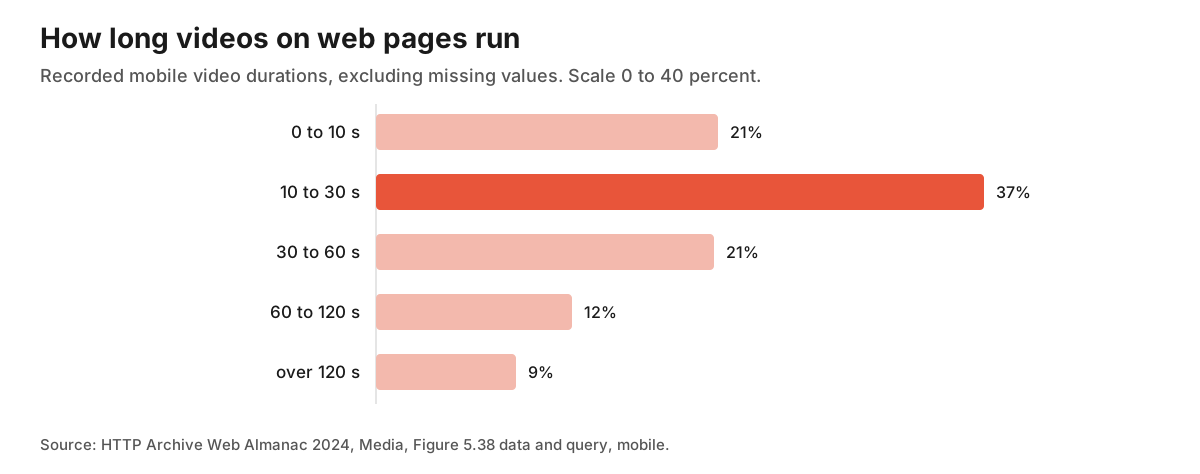
The first two duration groups account for more than half of the observations, and the first four for roughly nine out of ten. The query includes each group's upper boundary, so a clip lasting exactly 30 seconds belongs in the second group and one lasting exactly 120 seconds belongs in the fourth. Do not treat sums of rounded labels as precise cumulative rates.
This is a description of what exists, not a recommendation. Video elements can serve as background loops, animated illustrations or product shots as well as explanations. A 20 second loop and a 20 second walkthrough can have the same duration. The duration query does not classify their purpose. The chart shows that longer recorded durations are a minority in this crawl. It does not identify the length that would work best for a product demo.
What a short video earns in attention
Wistia's guide to video length reports that videos under a minute average a 52 percent engagement rate, which it describes as viewers typically watching half of the total length. For two types of videos under a minute, it reports 46 percent for customer testimonials and 50 percent for product videos. It adds that engagement declines after the five minute mark. In the State of Video report, the line is plain: the shorter the video, the higher the engagement rate.
Here is a simple piece of arithmetic that follows from those figures. It is our own illustration, not a Wistia result. If viewers watch about half of a 60 second video, the average viewer sees roughly 30 seconds. If viewers watch about half of a 45 second video, the average is a little over 22 seconds. An average hides the spread, since some people leave after five seconds and some watch to the end, but it suggests where to put the one thing you cannot afford to have missed. Put it early.
There is a counterpoint in the same report: shorter is not always better. A longer video can produce more viewing time even when viewers watch a smaller fraction of it. A tutorial library can justify long videos when people need that depth. A product page has a narrower job. Watch time is not what you want from a visitor deciding whether to try the product. You want them to understand what it does, and for that, minutes of viewing are a cost to the visitor, not a benefit to you.
One more figure is worth keeping in mind. Wistia says thank you pages and contact pages each hold a 10 percent play rate. It names homepages, video galleries and product pages as the places with the highest play rates, but the specific values for those pages sit in a chart image rather than in text, so we do not quote them here. What can be said is that the page type matters, and that a video next to a decision gets watched by some visitors and ignored by many.
Choose the one job of the video
Before you write a script, decide which of three jobs the video has. Wistia's own guide groups lengths by purpose: product demos and how to videos sit in its educate or explain range of one to five minutes, while product walkthroughs and case studies sit in a longer convert or nurture range. That grouping is a vendor view, not a rule, but the idea is useful.
For a small product page, three jobs cover most cases.
- Show the result. A visitor sees the product doing its main task from start to finish, with no narration about the company. This is the short demo, and our editorial starting point would be under a minute, possibly under 30 seconds. The observational data does not establish an optimal length.
- Remove one specific doubt. If your support inbox keeps getting the same question, such as how does it connect to my data or what happens to my existing files, answer that question and nothing else. This can be a clip of 20 to 40 seconds placed beside the doubt.
- Teach a first step. This belongs in onboarding or the docs, not on the page that a stranger lands on. A longer video is fine there because the viewer has already decided to try the product.
If you cannot say in one sentence which of these your video does, the video is probably trying to do all three, and a viewer who watches half of it will miss at least one.
Write for the viewer who leaves early
Start with the product doing the work. Skip the logo animation, the greeting and the sentence about what you will cover. Show the input, then the result, then say in a sentence who it is for.
Here is an editorial outline for a 40 second demo, not a length shown to outperform another version.
- Seconds 0 to 5: the screen where the user starts, with the real data they would bring.
- Seconds 5 to 25: the single action, done once, at a pace a first time viewer can follow.
- Seconds 25 to 35: the result on screen, held long enough to read.
- Seconds 35 to 40: one line saying what to do next, such as start a free trial.
Record the real product, not a mock. If the demo requires a setup that takes ten minutes, show the finished state and say so on screen. And do not rely on sound alone. Captions also help anyone who watches without sound or cannot hear it. The MDN reference for the video element notes that videos should provide both captions and transcripts that accurately describe their content, and shows how to attach a captions track with the track element.
Check the playback settings yourself
The Web Almanac also publishes video attribute counts. Its linked spreadsheet and SQL divide each attribute count by the total count of attributes, not by the number of video elements. The chart below shows a selected subset of those mobile attribute shares. It is not an adoption rate per video. The table also gives preload about 11 percent, whereas the chapter description says 16 percent; this chart follows the table and query.
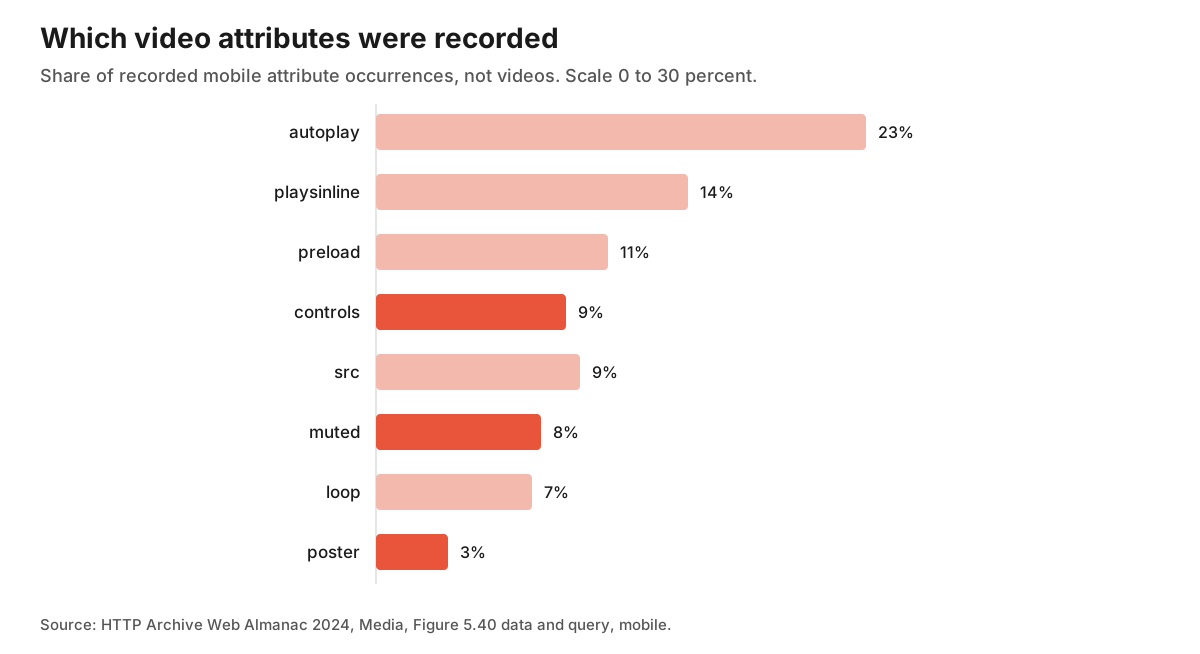
Controls account for about 9 percent and poster for about 3 percent of recorded attribute occurrences. These ratios cannot tell us what share of videos have controls or a poster, whether a custom player supplies its own controls, or whether a demo is configured well. Use the attributes as a checklist for your own player, rather than a benchmark of how many other pages are doing it correctly.
Here is what the settings do, according to MDN.
- poster is an image shown while the video is downloading. Without it, nothing is displayed until the first frame is available. For a demo, choose a poster that previews the product, and keep the real play control visible. Its download timing depends on how the element is loaded; an image drawn to look like a button is not a substitute for an accessible control.
- preload tells the browser how much to fetch ahead of time. The values are none, metadata and auto, and the specification calls the attribute a mere hint that the browser may ignore. For a video that waits for a click, metadata or none requests less advance downloading. The browser can ignore that hint, and autoplay takes precedence over it. Test actual requests before assuming the full file stays unfetched, and check the wait when a visitor presses play.
- controls shows the browser's playback controls, including volume, seeking and pause. A demo that someone cannot pause is hard to follow, so leave controls on.
- autoplay requests automatic playback. MDN says muted media or media without an audio track avoids audible autoplay blocking. Prior interaction or site allowlisting can also permit playback, while browser settings and permissions still matter. MDN's Safari example includes playsinline as a requirement. For a silent looping hero clip, use muted and playsinline, test the actual behavior, and keep the explaining video separate so it waits for a click.
Autoplay accounts for about 23 percent of recorded attributes in that table; that is not the share of pages that attempt autoplay. Autoplay with sound is the case most likely to fail, and starting audio the moment a page loads can be an unwelcome surprise to visitors, in the words of the MDN guide.
Hosting is a separate decision from markup. A platform embed can bring its own player, its own analytics and its own page weight. Measure the player you actually use instead of borrowing a generic embed cost. Open your page with a throttled connection, test with and without the embed, and compare the load time you see.
Measure before you rebuild it
Treat the first version as an experiment, in the same way as a trial length or a price.
Record four things for a few weeks before changing anything: visits to the page, the share of visitors who press play, how far they watch, and what they do after. Use your player's analytics if available. Otherwise, you can fire an event when the video starts and again at about the halfway point and the end, then read the counts in your analytics. Test that the events show up before you trust them. Decide whether you count visitors or sessions, and avoid counting repeated plays as new people when you divide by page visitors.
Then change one thing at a time, in this order.
- Add or fix the poster.
- Cut the video to the shortest version that still shows the result.
- Move the strongest ten seconds to the start.
- Place the video next to the decision it supports, such as the signup button or the pricing table.
With a few hundred visits a month, a small play rate change can be difficult to interpret; uncertainty depends on the counts and the starting rate. Keep the counts visible next to the percentages. Traffic mix, season and unrelated changes to the page all move these numbers, so a before and after comparison cannot prove the video caused a difference. If the evidence is thin, keep watching rather than concluding. The free trial guide uses the same habit of defining the measure first, and the launch checklist is a place to record what you changed and when.
When a video is the wrong tool
Not every product needs one. If the product can be understood from one annotated screenshot and three lines of text, a video can add downloads and production work to something the visitor could read in ten seconds. If you cannot get the explanation under a minute, the product may be asking for a better first screen, not a longer video. And if the page gets very few visits, a better use of the same hours may be talking to the people who did arrive.
The useful result is a short, honest demo that matches one decision on the page, and numbers that show whether people watched it. A video that answers the visitor's actual doubt in thirty seconds is worth more than a polished three minute tour that hides the answer until the end.
When the page tells the story you want, a free listing is one more place where people can find the product, and you can submit it to RadarMakers.
Sources
The Web Almanac and Wistia sources were checked on 14 November 2026. The duration chart uses recorded mobile durations with missing values excluded. The attribute chart uses the mobile attribute occurrence counts and their total in the data table and SQL linked from Figure 5.40. That denominator and the preload value differ from the chapter description; the chart follows the underlying data. Wistia's play rate and engagement by page values appear only as chart images, so only the figures stated in its text are used. The byte and time costs of embeds are not sourced and are left to your own test. The 60 and 45 second examples are our arithmetic, and the outline of a 40 second video is an editorial suggestion.
- HTTP Archive, Web Almanac 2024, Media chapter, published 29 December 2024, video element adoption and links to the source data and queries for Figures 5.38 and 5.40.
- HTTP Archive, duration data table and duration query, source observations and missing duration exclusion for Figure 5.38.
- HTTP Archive, attribute data table and attribute query, source counts and occurrence denominator for Figure 5.40.
- HTTP Archive, Web Almanac 2024, Methodology, June 2024 crawl and dataset size.
- Wistia, State of Video report, 22 April 2026, play rate and engagement definitions, sample size, page type findings.
- Wistia, How to choose the right marketing video length, originally published 1 July 2025, with the current page referring to the 2026 report, engagement for videos under a minute and purpose based length ranges.
- MDN, The video element, poster, preload, controls, captions and accessibility.
- MDN, Autoplay guide for media and Web Audio APIs, autoplay availability and the playsinline requirement for Safari.
0 replies
Sign in to join the discussion
Log in