Every form field past the eighth costs you five percent
generalThe Baymard Institute has been running checkout usability studies for over a decade, and their finding on form fields is one of those numbers that should change what you build on Monday.
The average checkout shows 11.3 form elements by default. The optimum is 7 to 8. Completion drops 4 to 6 percent for every field past the eighth.
What that compounds to
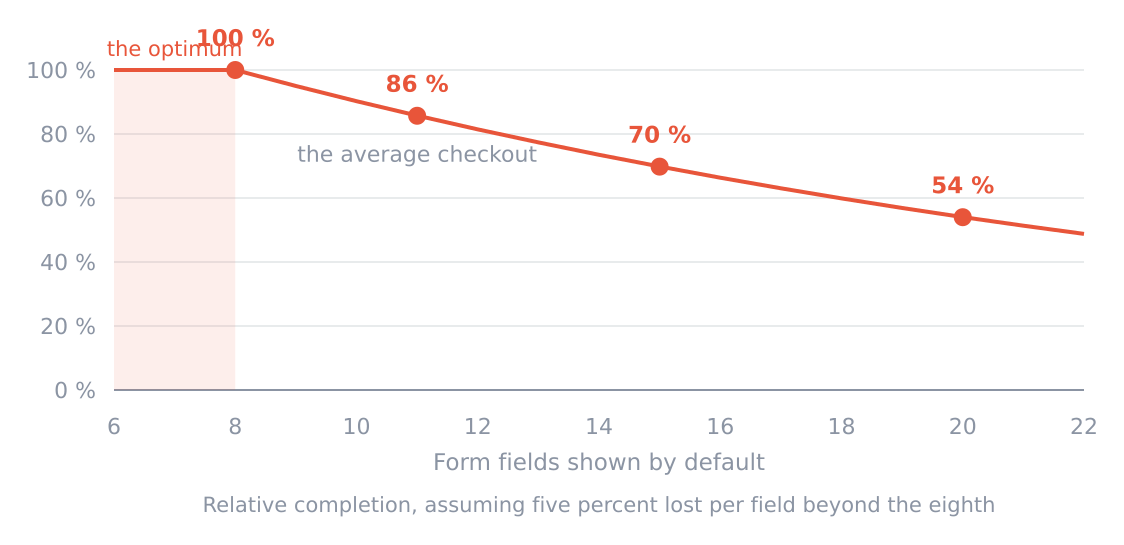
Assuming five percent lost per field past the eighth. The losses multiply, they don't add.
| Fields shown | Relative completion |
|---|---|
| 8 | 100 percent |
| 11, the average | 86 percent |
| 15 | 70 percent |
| 20 | 54 percent |
A fifteen field form completes at 70 percent of an eight field one. Going from fifteen to eight is a 43 percent relative improvement, which is larger than any copy change I have ever seen work, and it's achieved by deleting things.
The multiplication is the part people miss. Each field is a small loss and you reason about them one at a time, so each new one seems harmless. They compound, and nobody ever sits down and evaluates the twelfth field against the total.
Why the fields are there
Almost none of them are there for the customer. They're there because somebody, at some point, wanted the data.
Company name, because it looks more professional on the invoice. Phone number, because sales might want it. How did you hear about us, because attribution is hard. Job title, because it would be useful for segmentation later.
Every one of those is a real internal want, and every one is being paid for at checkout by the person least willing to pay for it, which is a stranger who hasn't yet decided you're worth the trouble.
The test I use is whether I could get the same information later, after they're a customer, when they have a reason to help me. Nearly always the answer is yes. Company name can be asked on the first invoice. Attribution can be a one question survey in week two, which gets better answers anyway because they're no longer in a hurry.
The abandonment reasons
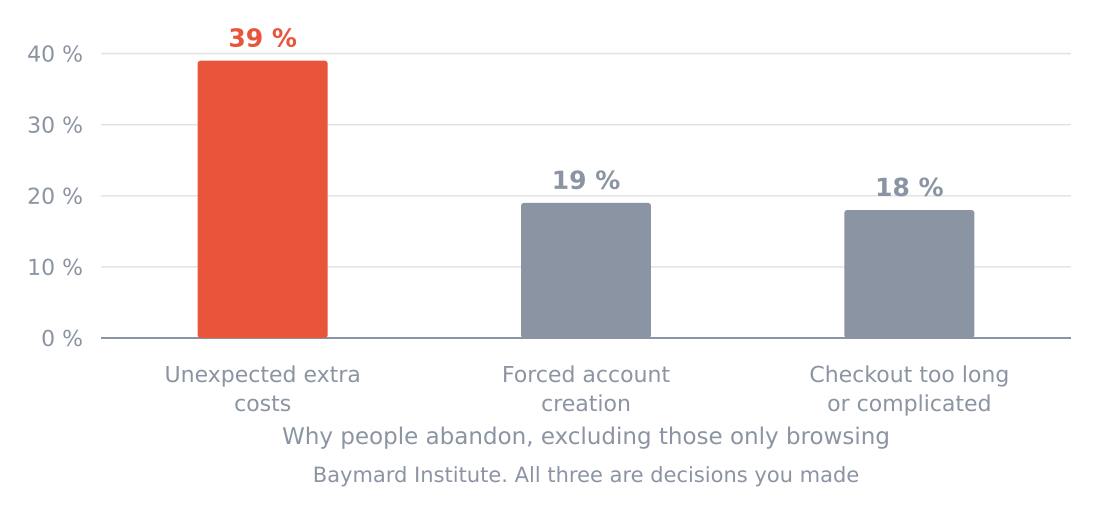
Baymard Institute, from a meta analysis of fifty studies.
| Reason | Share |
|---|---|
| Unexpected extra costs | 39 percent |
| Forced account creation | 19 percent |
| Checkout too long or complicated | 18 percent |
Set aside that 43 percent of people abandoning were only browsing, which isn't a problem to be solved. Of the rest, those three account for the large majority, and here's the thing they have in common.
All three are decisions somebody made. Not facts about the customer, not market conditions, not the economy. Somebody chose to show the shipping cost at step four. Somebody chose to require an account. Somebody added the eleventh field.
That's unusually good news, because it means the fixes are all inside the building.
Extra costs, which is the biggest one
Thirty nine percent, and the fix isn't to make things cheaper. It's to stop the surprise.
A cost revealed at step four doesn't just add money, it retroactively makes the reader distrust the three steps they've already completed. They now suspect there's a fifth surprise coming. That's why the effect is so much larger than the amount involved.
For software this shows up as per seat pricing that only becomes clear at checkout, as a setup fee, as a mandatory annual commitment discovered at the payment step, or as tax added at the end. If any number in your flow appears later than the pricing page, that's the one to move.
Accounts, which is the cheapest one
Nineteen percent abandon because they're forced to create an account.
For most software an account is genuinely required, since the product is the account. But look at when you ask. Requiring registration before somebody can see whether the thing works is a different decision from creating the account as a side effect of them starting to use it.
The version that works is that they do something valuable first, and the account is created at the moment they want to keep the result. Same account, same data, entirely different position in the sequence.
How to audit your own in ten minutes
Open your signup and count the form elements. Not the fields you remember, the actual elements, including the checkbox for terms, the newsletter opt in, and the country dropdown.
For each one, ask two questions. Could I ask this after they're a customer. And what happens if this is wrong or blank.
The second question is the useful one. If a wrong value has no consequence, the field is decoration. My signup had a company name field for a year, and about a fifth of the values were nonsense, because people who don't want to give you something don't leave it blank, they type a full stop.
That's the field's real conversion cost with no data to show for it.
0 replies
Sign in to join the discussion
Log in